 HackTricks Cloud
GCP - IAM Privesc
IAM
Find more information about IAM in:
GCP - IAM, Principals & Org Policies Enum
iam.roles.update (iam.roles.get)
If a principal can update a custom role assigned to it, it can add permissions to that role and inherit access to other resources. The IAM API documents iam.roles.update for changing a custom role definition, while the original research demonstrates using that change to add a privilege to the caller's assigned role.[1][3][4]
gcloud iam roles update <rol name> --project <project> --add-permissions <permission>
You can find a script to automate the creation, exploit and cleaning of a vuln environment here and a Python script to abuse this privilege here. For more information check the original research.[1][18]
gcloud iam roles update <Rol_NAME> --project <PROJECT_ID> --add-permissions <Permission>
iam.roles.create & iam.serviceAccounts.setIamPolicy
The iam.roles.create permission allows creating custom roles at project or organization scope. In the hands of an attacker, this is dangerous because it enables defining a permission set that can later be granted to a principal—for example, by setting a service account IAM policy—with the goal of escalating privileges.[3][5][6]
gcloud iam roles create <ROLE_ID> \
  --project=<PROJECT_ID> \
  --title="<Title>" \
  --description="<Description>" \
  --permissions="permission1,permission2,permission3"
iam.serviceAccounts.getAccessToken (iam.serviceAccounts.get)
The iam.serviceAccounts.getAccessToken permission authorizes requesting an OAuth access token for a service account. If the target service account has more privileges than the caller, the token can be used to act with those privileges; iam.serviceAccounts.get may additionally be needed to discover or inspect the account, depending on the workflow.[1][2][8][9]
For a resource-driven variant where attacker-controlled code steals a managed Vertex AI Agent Engine runtime token from the metadata service and reuses it as the Vertex AI service agent, check:
GCP - Vertex AI Post Exploitation
gcloud --impersonate-service-account="${victim}@${PROJECT_ID}.iam.gserviceaccount.com" \
  auth print-access-token
You can find a script to automate the creation, exploit and cleaning of a vuln environment here and a Python script to abuse this privilege here. For more information check the original research.[1][19][20]
iam.serviceAccountKeys.create
An attacker with iam.serviceAccountKeys.create can create a user-managed key for a service account. The private key is returned only when the key is created and can then be used to authenticate to Google Cloud as that service account.[1][2][10][11][12]
gcloud iam service-accounts keys create --iam-account <name> /tmp/key.json

gcloud auth activate-service-account --key-file=sa_cred.json
Use the actual output path from the first command (for example, /tmp/key.json) as the --key-file value when activating the account.[11][12]
You can find a script to automate the creation, exploit and cleaning of a vuln environment here and a Python script to abuse this privilege here. For more information check the original research.[1][21][22]
Note that iam.serviceAccountKeys.update is not a way to replace a key's private material: the current keys API exposes create/upload, enable/disable, and delete operations rather than a general key-update operation. To replace key material, create or upload a new user-managed key, which requires iam.serviceAccountKeys.create.[10][12]
iam.serviceAccounts.implicitDelegation
If service account A has iam.serviceAccounts.implicitDelegation on service account B, and B has iam.serviceAccounts.getAccessToken on service account C, A can use the delegation chain to create a token for C. Google documents this as a programmatic generateAccessToken() flow; here is a diagram to help explain.[1][2][8]
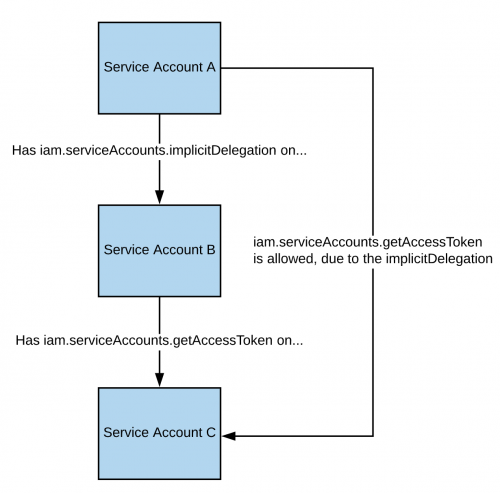
The documentation states that this advanced delegation use case is supported programmatically through generateAccessToken(), so the token is requested through the API directly:[2][8][15]
curl -X POST \
    'https://iamcredentials.googleapis.com/v1/projects/-/serviceAccounts/'"${TARGET_SERVICE_ACCOUNT}"':generateAccessToken' \
    -H 'Content-Type: application/json' \
    -H 'Authorization: Bearer '"$(gcloud auth print-access-token)" \
    -d '{
        "delegates": ["projects/-/serviceAccounts/'"${DELEGATED_SERVICE_ACCOUNT}"'"],
        "scope": ["https://www.googleapis.com/auth/cloud-platform"]
    }'
You can find a script to automate the creation, exploit and cleaning of a vuln environment here and a Python script to abuse this privilege here. For more information check the original research.[1][23][24]
iam.serviceAccounts.signBlob
An attacker with iam.serviceAccounts.signBlob can have Google sign arbitrary bytes with the service account's system-managed key. One abuse is to create an unsigned JWT assertion and send it as a blob to get the JWT signed by the target service account; the signed assertion can then be exchanged for an access token. For more information read this.[1][2][13][26]
You can find a script to automate the creation, exploit and cleaning of a vuln environment here and a Python script to abuse this privilege here and here. For more information check the original research.[1][25][26][27]
iam.serviceAccounts.signJwt
An attacker with iam.serviceAccounts.signJwt can have Google sign a well-formed JSON web token (JWT). Unlike signBlob, which accepts arbitrary bytes, signJwt expects a JWT payload; this is easier for JWT-based flows but cannot sign arbitrary bytes.[1][2][14][29]
You can find a script to automate the creation, exploit and cleaning of a vuln environment here and a Python script to abuse this privilege here. For more information check the original research.[1][28][29]
iam.serviceAccounts.setIamPolicy
An attacker with iam.serviceAccounts.setIamPolicy can add IAM policy bindings to a service account and grant itself the permissions needed to impersonate that service account. In the following example we grant ourselves the roles/iam.serviceAccountTokenCreator role over the interesting SA; that role includes the token-creation permissions described above.[2][6][7]
gcloud iam service-accounts add-iam-policy-binding "${VICTIM_SA}@${PROJECT_ID}.iam.gserviceaccount.com" \
    --member="user:username@domain.com" \
    --role="roles/iam.serviceAccountTokenCreator"

# If you still have problems, grant yourself this permission as well
gcloud iam service-accounts add-iam-policy-binding "${VICTIM_SA}@${PROJECT_ID}.iam.gserviceaccount.com" \
    --member="user:username@domain.com" \
    --role="roles/iam.serviceAccountUser"
You can find a script to automate the creation, exploit and cleaning of a vuln environment here.[30]
iam.serviceAccounts.actAs
The iam.serviceAccounts.actAs permission is conceptually similar to the iam:PassRole permission from AWS: it lets a principal attach a service account to a resource. Creating the resource still requires that service's own permissions, and jobs launched on the resource run as the attached service account. Exploiting iam.serviceAccounts.actAs therefore involves methods that require a set of permissions, contrasting with paths that need only one IAM permission.[1][2]
Service account impersonation
Impersonating a service account can be very useful to obtain new and better privileges, because requests are authorized with the service account's permissions.[2][15] There are three ways in which you can impersonate another service account:
- Authentication using RSA private keys (covered above)
- Authorization using Cloud IAM policies (covered here)
- Deploying jobs on GCP services (more applicable to the compromise of a user account)
iam.serviceAccounts.getOpenIdToken
An attacker with iam.serviceAccounts.getOpenIdToken can generate a Google-signed OpenID Connect (OIDC) JWT. These tokens assert the service account's identity and audience; they do not by themselves grant authorization to a target resource.[2][16]
The token must include an audience identifying the service where it will be presented, and Google signs the resulting JWT with the service account identity. The linked post provides an additional worked example.[2][16]
You can generate an OpenIDToken (if you have the access) with:
# First activate the SA with iam.serviceAccounts.getOpenIdToken over the other SA
gcloud auth activate-service-account --key-file=/path/to/svc_account.json
# Then, generate token
gcloud auth print-identity-token "${ATTACK_SA}@${PROJECT_ID}.iam.gserviceaccount.com" --audiences=https://example.com
Then you can just use it to access the service with:
curl -v -H "Authorization: Bearer id_token" https://some-cloud-run-uc.a.run.app
Google documents Google-signed ID tokens for authenticating to services including Cloud Run, Cloud Run functions, Identity-Aware Proxy, and Cloud Endpoints:[16]
- Google Cloud Run
- Google Cloud Functions
- Google Identity Aware Proxy
- Google Cloud Endpoints (if using Google OIDC)
You can find an example on how to create an OpenID token on behalf of a service account here; Google's current ID-token guide documents the supported API and CLI flows.[16][17]
References
- [1] Privilege Escalation in Google Cloud Platform – Part 1 (IAM) | Rhino Security Labs
- [2] Roles for service account authentication | Google Cloud Documentation
- [3] Create and manage custom roles | Google Cloud Documentation
- [4] gcloud iam roles update | Google Cloud SDK
- [5] gcloud iam roles create | Google Cloud SDK
- [6] Method: projects.serviceAccounts.setIamPolicy | IAM REST API
- [7] gcloud iam service-accounts add-iam-policy-binding | Google Cloud SDK
- [8] Method: projects.serviceAccounts.generateAccessToken | IAM Credentials API
- [9] gcloud auth print-access-token | Google Cloud SDK
- [10] Method: projects.serviceAccounts.keys.create | IAM REST API
- [11] gcloud iam service-accounts keys create | Google Cloud SDK
- [12] REST Resource: projects.serviceAccounts.keys | IAM REST API
- [13] Method: projects.serviceAccounts.signBlob | IAM Credentials API
- [14] Method: projects.serviceAccounts.signJwt | IAM Credentials API
- [15] Service accounts overview | Google Cloud Documentation
- [16] Get an ID token | Google Cloud Documentation
- [17] gcloud auth print-identity-token | Google Cloud SDK
- [18] iam.roles.update.py | Rhino Security Labs
- [19] 4-iam.serviceAccounts.getAccessToken.sh | gcp_privesc_scripts
- [20] iam.serviceAccounts.getAccessToken.py | Rhino Security Labs
- [21] 3-iam.serviceAccountKeys.create.sh | gcp_privesc_scripts
- [22] iam.serviceAccountKeys.create.py | Rhino Security Labs
- [23] 5-iam.serviceAccounts.implicitDelegation.sh | gcp_privesc_scripts
- [24] iam.serviceAccounts.implicitDelegation.py | Rhino Security Labs
- [25] 6-iam.serviceAccounts.signBlob.sh | gcp_privesc_scripts
- [26] iam.serviceAccounts.signBlob-accessToken.py | Rhino Security Labs
- [27] iam.serviceAccounts.signBlob-gcsSignedUrl.py | Rhino Security Labs
- [28] 7-iam.serviceAccounts.signJWT.sh | gcp_privesc_scripts
- [29] iam.serviceAccounts.signJWT.py | Rhino Security Labs
- [30] d-iam.serviceAccounts.setIamPolicy.sh | gcp_privesc_scripts
[!TIP] Learn & practice AWS Hacking:
HackTricks Training AWS Red Team Expert (ARTE)
Learn & practice GCP Hacking:HackTricks Training GCP Red Team Expert (GRTE)
Learn & practice Az Hacking:HackTricks Training Azure Red Team Expert (AzRTE)
Browse the full HackTricks Training catalog.Support HackTricks
- Check the subscription plans!
- Join the 💬 Discord group or the telegram group or follow us on Twitter 🐦 @hacktricks_live.
- Share hacking tricks by submitting PRs to the HackTricks and HackTricks Cloud github repos.