 HackTricks Cloud
Kubernetes Role-Based Access Control(RBAC)
Role-Based Access Control (RBAC)
Kubernetes has an authorization module named Role-Based Access Control (RBAC) that helps to set utilization permissions to the API server.[1]
RBAC’s permission model is built from three individual parts:
- Role\ClusterRole – The actual permission. It contains rules that represent a set of permissions. Each rule contains resources and verbs. The verb is the action that will apply on the resource.[1][2][3]
- Subject (User, Group or ServiceAccount) – The object that will receive the permissions.[1]
- RoleBinding\ClusterRoleBinding – The connection between Role\ClusterRole and the subject.[1]
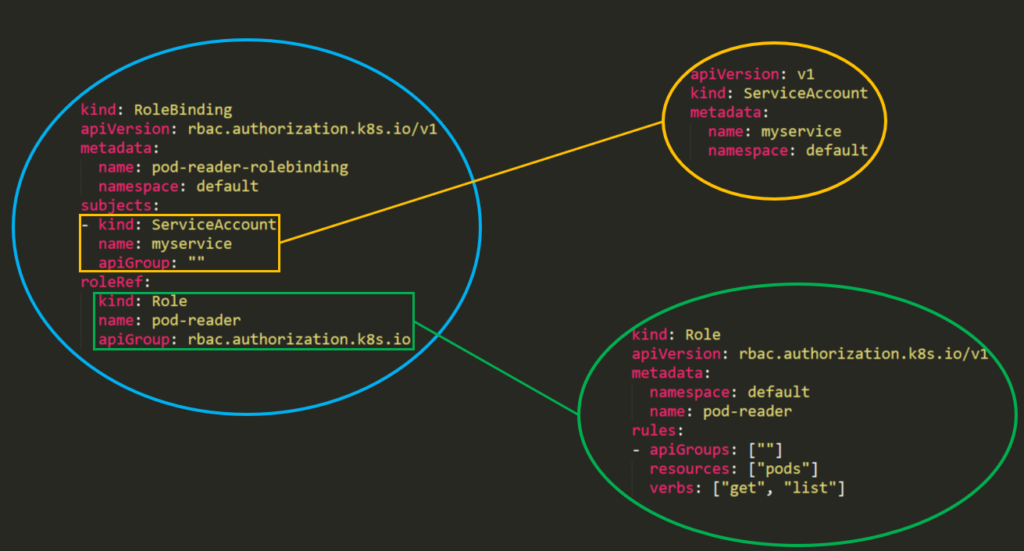
The difference between “Roles” and “ClusterRoles” is where the role is defined and applied: a “Role” grants access within one specific namespace, while a “ClusterRole” can be granted in all namespaces in the cluster.[1] Moreover, ClusterRoles can also grant access to:[1]
- cluster-scoped resources (like nodes).
- non-resource endpoints (like /healthz).
- namespaced resources (like Pods), across all namespaces.
RBAC became beta in Kubernetes 1.6 and generally available in 1.8; many clusters and provisioning strategies enabled it by default from the 1.6 beta onward, but verify the API server's actual authorizer configuration.[4] To enable RBAC, you can use something like:
kube-apiserver --authorization-mode=Example,RBAC --other-options --more-options
Modern clusters can also configure the API server authorizer chain with --authorization-config, which points to an AuthorizationConfiguration file. This file can define ordered authorizers, multiple webhook authorizers, webhook timeouts, failurePolicy, cache settings, and CEL matchConditions that decide which requests are sent to a webhook. During a security review, do not stop at --authorization-mode if --authorization-config is present: read the referenced file and check whether a webhook can fail open with NoOpinion, whether match conditions skip sensitive resources, and whether all API server replicas use equivalent authorization configuration.[3]
Also check authentication configuration when reviewing anonymous API exposure. --authentication-config can scope the anonymous authenticator to specific paths such as /livez, /readyz, and /healthz. Anonymous health endpoint access is not the same as anonymous access to Kubernetes resources; the dangerous condition is an RBAC or authorizer path that lets system:anonymous or system:unauthenticated read or modify real API objects.[5]
Finally, treat membership in system:masters as cluster-admin-equivalent. Users or certificates in this group have unrestricted API access that bypasses normal RBAC and webhook authorization restrictions, so identity mappings that add this group can be more important than ordinary RoleBinding output.[3]
Templates
In the template of a Role or a ClusterRole you will need to indicate the name of the role, the namespace (in roles) and then the apiGroups, resources and verbs of the role:[1]
- The apiGroups is an array that contains the different API namespaces that this rule applies to. For example, a Pod definition uses apiVersion: v1. It can has values such as rbac.authorization.k8s.io or [*].
- The resources is an array that defines which resources this rule applies to. You can find all the resources with:
kubectl api-resources --namespaced=true - The verbs is an array that contains the allowed verbs. The verb in Kubernetes defines the type of action you need to apply to the resource. For example, the list verb is used against collections while "get" is used against a single resource.
Rules Verbs
(This info was taken from the docs)[3]
| HTTP verb | request verb |
|---|---|
| POST | create |
| GET, HEAD | get (for individual resources), list (for collections, including full object content), watch (for watching an individual resource or collection of resources) |
| PUT | update |
| PATCH | patch |
| DELETE | delete (for individual resources), deletecollection (for collections) |
Kubernetes sometimes checks authorization for additional permissions using specialized verbs. For example:
- PodSecurityPolicy (deprecated in v1.21 and removed in v1.25)
- RBAC
bindandescalateverbs onrolesandclusterrolesresources in therbac.authorization.k8s.ioAPI group.[1]
- Authentication
impersonateverb onusers,groups, andserviceaccountsin the core API group, and theuserextrasin theauthentication.k8s.ioAPI group.[5]
Kubernetes v1.36 also includes constrained impersonation as a beta feature. Instead of only granting the legacy all-or-nothing impersonate verb, clusters can grant mode-specific verbs such as impersonate:user-info, impersonate:serviceaccount, impersonate:arbitrary-node, or impersonate:associated-node, plus action-specific verbs such as impersonate-on:user-info:list on the target resource. Review both halves: the identity the subject can impersonate and the actions it can perform while impersonating. Legacy impersonate rules can still allow broader access, so do not assume constrained-looking verbs are enforced unless the API server version and access-review evidence confirm it.[8]
[!WARNING] You can find all the verbs that each resource support executing
kubectl api-resources --sort-by name -o wide
Examples
apiVersion: rbac.authorization.k8s.io/v1
kind: Role
metadata:
  namespace: defaultGreen
  name: pod-and-pod-logs-reader
rules:
  - apiGroups: [""]
    resources: ["pods", "pods/log"]
    verbs: ["get", "list", "watch"]
apiVersion: rbac.authorization.k8s.io/v1
kind: ClusterRole
metadata:
  # "namespace" omitted since ClusterRoles are not namespaced
  name: secret-reader
rules:
  - apiGroups: [""]
    resources: ["secrets"]
    verbs: ["get", "watch", "list"]
For example you can use a ClusterRole to allow a particular user to run:[1]
kubectl get pods --all-namespaces
RoleBinding and ClusterRoleBinding
From the docs: A role binding grants the permissions defined in a role to a user or set of users. It holds a list of subjects (users, groups, or service accounts), and a reference to the role being granted. A RoleBinding grants permissions within a specific namespace whereas a ClusterRoleBinding grants that access cluster-wide.[1]
apiVersion: rbac.authorization.k8s.io/v1
# This role binding allows "jane" to read pods in the "default" namespace.
# You need to already have a Role named "pod-reader" in that namespace.
kind: RoleBinding
metadata:
  name: read-pods
  namespace: default
subjects:
  # You can specify more than one "subject"
  - kind: User
    name: jane # "name" is case sensitive
    apiGroup: rbac.authorization.k8s.io
roleRef:
  # "roleRef" specifies the binding to a Role / ClusterRole
  kind: Role #this must be Role or ClusterRole
  name: pod-reader # this must match the name of the Role or ClusterRole you wish to bind to
  apiGroup: rbac.authorization.k8s.io
apiVersion: rbac.authorization.k8s.io/v1
# This cluster role binding allows anyone in the "manager" group to read secrets in any namespace.
kind: ClusterRoleBinding
metadata:
  name: read-secrets-global
subjects:
  - kind: Group
    name: manager # Name is case sensitive
    apiGroup: rbac.authorization.k8s.io
roleRef:
  kind: ClusterRole
  name: secret-reader
  apiGroup: rbac.authorization.k8s.io
Permissions are additive so if you have a clusterRole with “list” and “delete” secrets you can add it with a Role with “get”. So be aware and test always your roles and permissions and specify what is ALLOWED, because everything is DENIED by default.[1][3]
Details worth checking
RBAC uses resource names as they appear in API URLs, not the YAML kind. A Pod is pods, a Deployment is deployments, and subresources are written with a slash such as pods/log, pods/exec, pods/portforward, pods/ephemeralcontainers, deployments/scale, serviceaccounts/token, nodes/proxy or services/proxy. A permission on pods does not automatically grant access to pods/exec or pods/log.[1]
resourceNames can restrict some requests to specific object names:
rules:
  - apiGroups: [""]
    resources: ["configmaps"]
    resourceNames: ["app-config"]
    verbs: ["get", "update"]
This does not restrict top-level create or deletecollection by name. For list and watch, the client must include a matching metadata.name field selector, otherwise the request is not authorized by that rule:[1]
kubectl get configmaps -n default --field-selector=metadata.name=app-config
Use exact access reviews for high-impact checks:[3][8]
kubectl auth can-i create pods/exec -n default
kubectl auth can-i create serviceaccounts/token -n default
kubectl auth can-i impersonate users
kubectl auth can-i bind clusterroles.rbac.authorization.k8s.io
kubectl auth can-i escalate clusterroles.rbac.authorization.k8s.io
kubectl auth can-i impersonate-on:user-info:list pods -n default
Enumerating RBAC
Use these commands to inspect effective permissions and the RBAC objects that grant them.[1][3]
# Get current privileges
kubectl auth can-i --list
# use `--as=system:serviceaccount:<namespace>:<sa_name>` to impersonate a service account

# List Cluster Roles
kubectl get clusterroles
kubectl describe clusterroles

# List Cluster Roles Bindings
kubectl get clusterrolebindings
kubectl describe clusterrolebindings

# List Roles
kubectl get roles
kubectl describe roles

# List Roles Bindings
kubectl get rolebindings
kubectl describe rolebindings
Abuse Role/ClusterRoles for Privilege Escalation
Abusing Roles/ClusterRoles in Kubernetes
References
- [1] Using RBAC Authorization
- [2] kubectl
- [3] Authorization
- [4] Using RBAC, Generally Available in Kubernetes v1.8
- [5] Authenticating
- [6] Pod Security Policies
- [7] Migrate from PodSecurityPolicy to the Built-In PodSecurity Admission Controller
- [8] User Impersonation
[!TIP] Learn & practice AWS Hacking:
HackTricks Training AWS Red Team Expert (ARTE)
Learn & practice GCP Hacking:HackTricks Training GCP Red Team Expert (GRTE)
Learn & practice Az Hacking:HackTricks Training Azure Red Team Expert (AzRTE)
Browse the full HackTricks Training catalog.Support HackTricks
- Check the subscription plans!
- Join the 💬 Discord group or the telegram group or follow us on Twitter 🐦 @hacktricks_live.
- Share hacking tricks by submitting PRs to the HackTricks and HackTricks Cloud github repos.